

The Multiple BSSID Element: Improving Airtime Efficiency
An access point (AP) can create two or more networks on the same Wi-Fi radio. This capability, known as Virtual AP (VAP), makes one physical AP appear to be several APs. It lets the AP provide separate wireless networks for different users and security requirements.
A common example is a guest network running alongside a home or business network. In this case, the AP advertises two SSIDs on the same channel: one for guests and another for regular users. Although this configuration is common, it comes at a cost: beacon overhead.
Beacon Overhead
An AP announces a wireless network by transmitting a beacon frame about ten times per second at the default beacon interval. Each additional network usually requires another beacon, so adding SSIDs increases the airtime consumed by beacon frames. You can estimate this impact with Andrew von Nagy’s SSID Overhead Calculator or the iOS app.
Beacon size and management-frame data rates also affect overhead. As wireless networks become more complex, their beacon frames tend to grow. In addition, APs usually transmit management frames at lower data rates. A beacon may therefore consume more airtime than a similar-sized frame sent at a higher rate.
Consider the following example from WiFi Explorer Pro 3’s Utilization Inspector, which shows the estimated beacon overhead for each Wi-Fi channel. Here, a packet capture contains beacons from one AP on channel 1. The AP advertises four SSIDs and uses a minimum basic rate of 1 Mbps. Its estimated beacon overhead is 11%, meaning that beacon transmissions consume 11% of the available airtime.

An AP transmitting four separate beacons ten times per second produces 11% beacon overhead.
Improving Airtime Efficiency
The IEEE 802.11ax-2021 amendment, also known as Wi-Fi 6, introduced several enhancements for high-efficiency wireless networks. One of them uses the Multiple BSSID element to reduce beacon overhead. Instead of transmitting a separate beacon for every SSID, an AP can combine information from several networks in one beacon or probe response.
Returning to the previous example, the AP could use a Multiple BSSID element to announce all four SSIDs in a single beacon. Doing so would reduce the estimated beacon overhead from 11% to 4%, recovering 7% of the channel’s airtime.

An AP sending one beacon ten times per second produces 4% beacon overhead.
This capability predates 802.11ax; IEEE first defined it in 802.11v-2011. However, 802.11ax requires support for Multiple BSSID in the 6 GHz band, where vendors can ensure that new clients can parse the element. APs may also use Multiple BSSID in the 2.4 and 5 GHz bands. Legacy clients in those bands may not recognize the element without updated drivers, so APs will likely continue sending separate beacons for each BSSID.
The Multiple BSSID Element
The Multiple BSSID element (ID 71) combines information for collocated networks operating on the same Wi-Fi channel into a single beacon or probe response. This approach avoids repeating common information elements, such as Supported Rates, HE Capabilities, and HE Operation, in separate frames and unnecessarily consuming airtime.
The BSSID that carries the Multiple BSSID element is called the transmitted BSSID, also known as the reference BSSID. The BSSIDs described within the element are called nontransmitted BSSIDs.
The Multiple BSSID element contains a field called the Max BSSID Indicator. This field specifies the maximum number of BSSIDs in the Multiple BSSID set, not the number of active BSSIDs. The element can also contain two types of optional subelements: Nontransmitted BSSID Profile and Vendor Specific.

The Multiple BSSID element (ID 71).
The Nontransmitted BSSID Profile contains information elements that define a nontransmitted BSSID when combined with those in the beacon or probe response.

The Nontransmitted BSSID Profile subelement.
The Multiple BSSID element includes a Nontransmitted BSSID Profile for each nontransmitted BSSID it advertises. However, an AP may advertise only a subset of its BSSIDs in the element.
Every Nontransmitted BSSID Profile includes two required information elements: SSID and Multiple BSSID-Index. It may also include the optional Nontransmitted BSSID Capability element and Non-Inheritance element extension. Other elements in the profile describe differences between the transmitted and nontransmitted BSSIDs, such as their security configurations. For the nontransmitted BSSID, these profile elements replace matching elements in the beacon that carries the Multiple BSSID element.
The SSID Element
The SSID element (ID 0) identifies the ESS, IBSS, or mesh network. A hidden network uses a zero-length string for this element.
The Multiple BSSID-Index Element
The Multiple BSSID-Index element (ID 85) identifies a nontransmitted BSSID within the Multiple BSSID set.
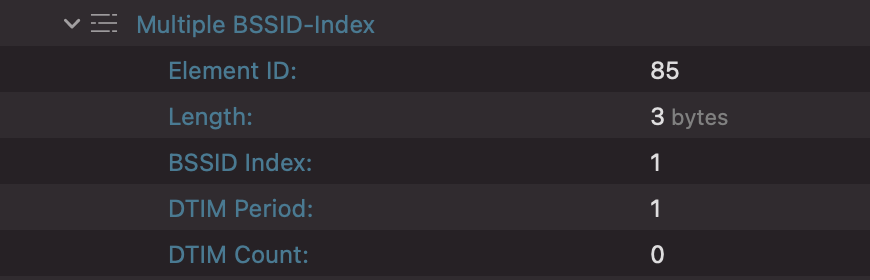
The Multiple BSSID-Index element (ID 85).
The BSSID Index field, the Max BSSID Indicator field, and the reference BSSID determine the nontransmitted BSSID. Assume that A0:A1:A2:A3:A4:A5 is the reference BSSID. In the following formula, i is the BSSID index and N = 2Max BSSID Indicator:
BSSIDi = A0:A1:A2:A3:A4:A5i
where
A5i = A5 - (A5 mod N) + (((A5 mod N) + i) mod N)
For example, suppose BSSID Index = 2, Max BSSID Indicator = 4 (16 BSSIDs), and reference BSSID = CC:88:C7:41:6D:30. The resulting nontransmitted BSSID is CC:88:C7:41:6D:32.
The Nontransmitted BSSID Capability Element
The Nontransmitted BSSID Capability element (ID 83) contains the BSS Capability Information field normally found in beacon and probe response frames. Among other details, it indicates whether the nontransmitted BSSID belongs to an ESS, IBSS, or mesh network and whether it supports a short preamble.

The Nontransmitted BSSID Capability element (ID 83).
The Non-Inheritance Element Extension
The Non-Inheritance element (ID 255, ID Extension 56) identifies information elements that a nontransmitted BSSID does not inherit. It contains two lists: one for element IDs and another for element ID extensions. If an ID matches an information element in the beacon or probe response carrying the Multiple BSSID element, the nontransmitted BSSID does not inherit that element.

The Non-Inheritance element extension (ID 255, ID Extension 56).
Networks Evolve, and So Does WiFi Explorer Pro 3
The limitations that prevent legacy 2.4 and 5 GHz clients from parsing the Multiple BSSID element also affect Wi-Fi tools, including scanners. Without Multiple BSSID support, a scanner sees only the transmitted BSSID in a beacon or probe response. It cannot display the networks described by the nontransmitted BSSID profiles.
Discovering 6 GHz networks directly in WiFi Explorer and WiFi Explorer Pro 3 remains limited by the availability of Macs with Wi-Fi 6E hardware. Nevertheless, we continue to update both apps with support for 6 GHz and its capabilities, including Multiple BSSID. WiFi Explorer Pro 3 can import packet captures containing 6 GHz networks. It can also scan the 2.4, 5, and 6 GHz bands remotely using a compatible Linux computer and an Intel AX210 card. In both cases, the app finds and displays nontransmitted BSSIDs included in a Multiple BSSID element.
The following screenshot shows four networks from one beacon frame: one transmitted BSSID and three nontransmitted BSSIDs. The three nontransmitted BSSIDs show 0 ms of beacon airtime because only the transmitted BSSID sends a beacon. They also use different security settings. Consequently, each Nontransmitted BSSID Profile contains an RSNE that defines a security configuration different from that of the transmitted BSSID.

WiFi Explorer Pro 3 displaying four networks from a single beacon frame.
Final Thoughts
Multiple BSSID is one of the 802.11ax features that improves Wi-Fi efficiency. Beacon transmissions can create substantial overhead in environments with many SSIDs. By combining information about several SSIDs in one beacon or probe response, an AP can reduce that overhead and free airtime for other traffic. Because APs operating in the 6 GHz band must support this capability, Wi-Fi tools must understand it to find and display every network advertised by a Wi-Fi 6E AP.
Thanks to Josh Schmelzle for providing the 6 GHz captures used in this article and for the discussions about Wi-Fi 6E.
Sources:
IEEE 802.11-2020 – IEEE Standard for Information Technology–Telecommunications and Information Exchange Between Systems – Local and Metropolitan Area Networks–Specific Requirements – Part 11: Wireless LAN Medium Access Control (MAC) and Physical Layer (PHY) Specifications. https://standards.ieee.org/standard/802_11-2020.html.
IEEE 802.11ax-2021 – IEEE Standard for Information Technology–Telecommunications and Information Exchange Between Systems Local and Metropolitan Area Networks–Specific Requirements Part 11: Wireless LAN Medium Access Control (MAC) and Physical Layer (PHY) Specifications Amendment 1: Enhancements for High-Efficiency WLAN. https://standards.ieee.org/standard/802_11ax-2021.html.
About the Author: Adrian Granados


[…] way, if you want to learn more about Multiple BSSID, Adrian Granados wrote a great technical blog on the […]
Nice and detailed write up. Couple of questions come up in this Multi BSSID senario:
1. Is there anything in the standard that tell which SSID is transmitted or it up to the vendor to decide what ssid to choose for transmitting.
2. Different SSID can have different properties like
– Min Data rates etc
How is this info sent for non transmitted ssids (Non-Inheritance element ??)
3. How are hidden ssids handled in this scenario?
Hi Bhupinder,
Good questions. Here are my answers:
1. I didn’t find anything in the standard that tells which SSID is transmitted and which SSIDs are advertised in the Multiple BSSID element. I’d say it’s up to the vendor to decide.
2. The information elements that are common but different between the transmitted BSSID and the non-transmitted BSSID are listed in the non-transmitted BSSID profile, so you take those elements and replace the elements in the transmitted BSSID to form a new set of elements that correspond to the non-transmitted BSSID, allowing you to specify the different properties. The non-inheritance element is used to indicate which elements from the transmitted BSSID are NOT part of the non-transmitted BSSID.
3. Each non-transmitted BSSID can specify its own SSID. For a hidden network, an SSID information element with an empty SSID would be listed as part of the non-transmitted BSSID profile.
Adrian
Thanks Adrian. This is really helpful.
Really nice post! Recently, I have studied on MBSSID. There is a question making me harassed. When different STAs, some of them support MBSSID and another don’t, which means some STAs can not analyse the MBSSID Beacon frame. Right? Then AP would to stop using MBSSID strategy and switch to the ordinary ones?(Each BSS sends beacon to all STAs)
Thank you!
In the context of 6 GHz, support for the MBSSID info element is mandatory. Hence, by definition, STAs that do not support MBSSID are not 6E capable either, so the AP doesn’t have to advertise 6E networks using individual beacons. It will continue to use MBSSID.
Dear Andrian,
Thank you for the detailed answers! It helps me alot!
Best regards,
Bowin
Dear Andrian,
I have also met the new content in MBSSID, which is called multi-frame MBSSID (MF-MBSSID). It seems that different MBSSID beacon frames are generated in an AP and each beacon frame does the same things as a single MBSSID bceacon does. But I have not found the detailed introduction in 2020 IEEE WIFI 6 documents. What scenarios it would use the MF—MBSSID strategy and what is the advantages of utilizing MF-MBSSID?~~~~
Looking forward to your comments. Appreciate it much if you could reply me.
Best regards,
Bowin
I’m not familiar with MF-MBSSID. I’ve never heard of it, to be honest.
Dear Adrian:
Appreciate it much for the reply.
I would like to apologize to you for spelling your name mistakenly in the former messages.
Sorry for that again.
All the best,
Bowin
Really useful and practical analysis!
It looks like there are some ways to recognise the Multiple BSSIDs, will the WiFi Explorer add features to group by Multiple BSSIDs for convenience?
Thank you!