
 Airtool 2

Airtool 2
Capture Wi-Fi packets with your Mac’s built-in Wi-Fi adapter in just a few clicks.
3-day free trial · Requires macOS 13.5 or later
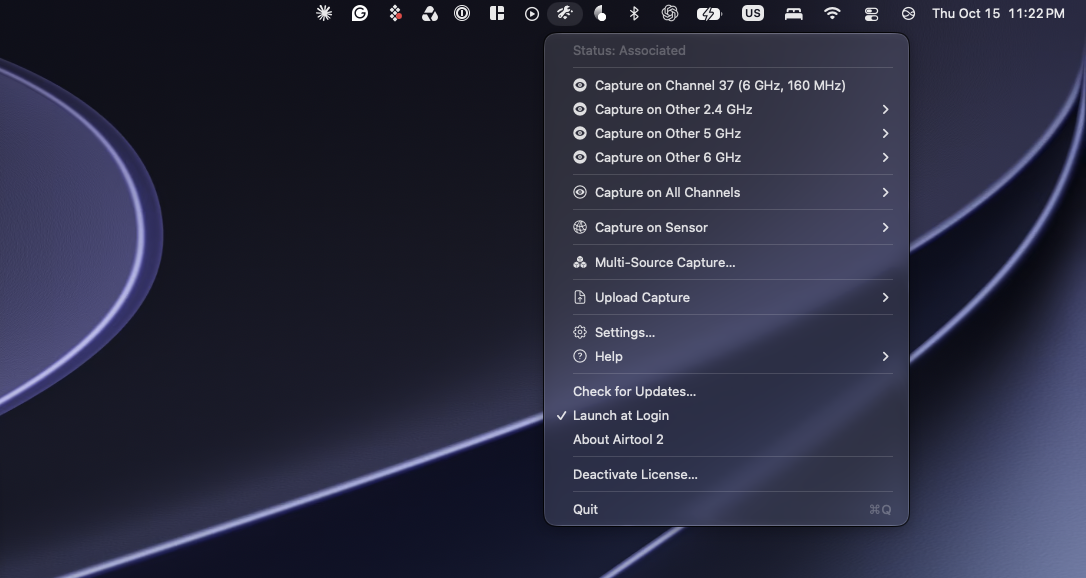
A must-have tool for every WLAN professional
Wi-Fi troubleshooting starts with a packet capture. Airtool 2 makes it easy.
Easy packet captures
Capture Wi-Fi traffic with your Mac’s adapter, or Zigbee and BLE traffic with a compatible USB dongle, and open captures in Wireshark automatically.
Flexible configuration
Choose the channel and width, slice data frames, and limit or rotate capture files to suit the task.
Cloud services integration
Upload captures automatically to CloudShark or Packets for analysis or sharing.
WIRESHARK
Seamless integration with Wireshark
Start a capture with one click, and Airtool 2 opens it in Wireshark when it’s done. You don’t need any commands or extra steps.


REMOTE CAPTURE
Remote and multi-channel captures
Capture remotely with a Linux sensor that has a compatible Wi-Fi adapter, such as the WLAN Pi. To capture several channels at once, use a sensor with multiple adapters, combine several sensors, or connect an Oscium Nomad or Hamina Clip to your Mac.
BEYOND WI-FI
Capture Zigbee, BLE and much more
Airtool 2 also captures Zigbee and Bluetooth Low Energy packets with a compatible USB sniffer dongle. It can also capture network traffic from your iPhone or iPad to troubleshoot problems that affect iOS devices.

