

As WPA3 adoption continues, one challenge keeps emerging in real deployments: not all clients behave the same way. Some fully support WPA3, some partially support it, and others don’t support it at all. Bridging that gap without breaking connectivity has proven challenging in actual environments.
WPA3 transition mode was originally designed to address this by allowing WPA2 and WPA3 to coexist on the same SSID. In practice, though, exposing both options equally hasn’t always worked well. Some legacy clients struggle with mixed AKMs, and even WPA3-capable clients don’t always behave as expected.
WPA3-Personal Compatibility Mode, as defined in the WPA3 specification, takes a more controlled approach. Instead of presenting all security options in the same way to every client, it refines how those capabilities are advertised, using a mechanism called RSN Override.
A Different Way to Present the Same Network
At a high level, WPA3-Personal Compatibility Mode still allows both WPA2 and WPA3 clients to connect to the same SSID, but the key difference lies in how that capability is presented. Rather than exposing everything in a single RSN element, the network separates WPA2 and WPA3 into different elements.
In transition mode, both WPA2 (PSK) and WPA3 (SAE) are advertised directly in the RSN element, and all clients see the same set of options. While simple, this may cause inconsistent behavior, especially with older devices.
Compatibility mode avoids this by advertising WPA2 in the standard RSN element while placing WPA3 information in RSN Override elements. All clients receive the same frames, but only those that understand RSN Override will recognize and use WPA3. Others will simply connect using WPA2 without issue.
The Role of RSN Override
In compatibility mode, the access point advertises a simplified and broadly compatible configuration in the standard RSN element, typically WPA2-Personal (PSK) with CCMP. This ensures that legacy clients see exactly what they expect and can connect reliably.
At the same time, the AP includes additional elements that carry WPA3-specific information, including SAE and stronger security parameters. These RSN Override elements provide an alternate view of the network for clients that know how to interpret them. As a result, WPA3-capable clients that support RSN Override will select WPA3, while others ignore these elements and proceed with WPA2 .
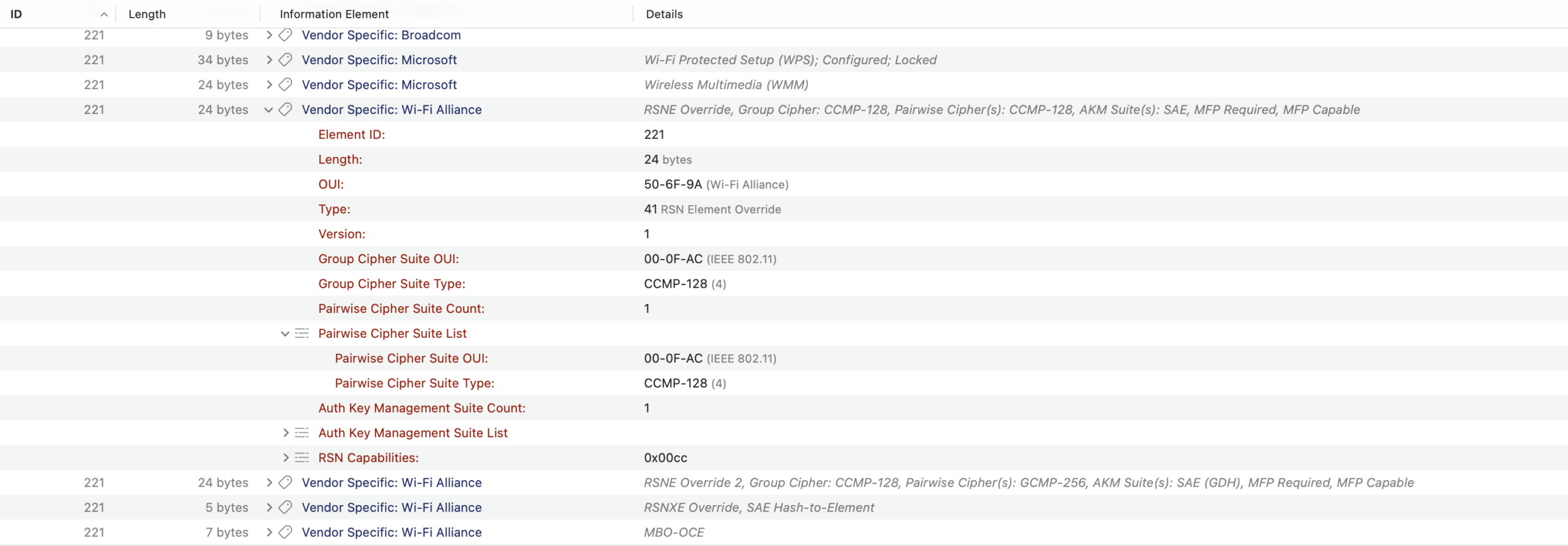
RSN Override Element
If you want a deeper dive into how RSN Override works and how such elements are structured, we covered it in detail here: Balancing Security and Compatibility with RSN Override.
Why This Approach Works Better
What makes compatibility mode effective is that it avoids forcing every client to interpret a complicated and possibly ambiguous set of options. Instead of relying on clients to make the right decision, the AP presents a simple, compatible baseline while still exposing stronger security to those that can use it.
This greatly reduces interoperability issues and eliminates the need to split networks into multiple SSIDs for WPA2 and WPA3, thereby decreasing operational complexity and RF overhead. At the same time, it provides a gradual migration path toward WPA3 without disrupting existing devices.
That said, the approach is not without trade-offs. If a WPA3-capable client does not support RSN Override, it will still connect using WPA2, effectively resulting in a downgrade. So while compatibility mode improves connectivity and stability, full WPA3 adoption still depends on client support.
How WiFi Explorer Displays It
With these differences in mind, simply labeling a network as “WPA2/WPA3” is no longer sufficient to describe its behavior. WiFi Explorer now detects when a network is operating in WPA3-Personal Compatibility Mode by analyzing how security capabilities are advertised.
Specifically, it identifies cases where WPA3 (SAE) is advertised in the RSN Override elements while the standard RSN element advertises WPA2 (PSK). When this pattern is detected, WiFi Explorer reports WPA2/WPA3 (Compatibility) in the Security column and indicates WPA3-Personal Compatibility Mode in the Network Details view.
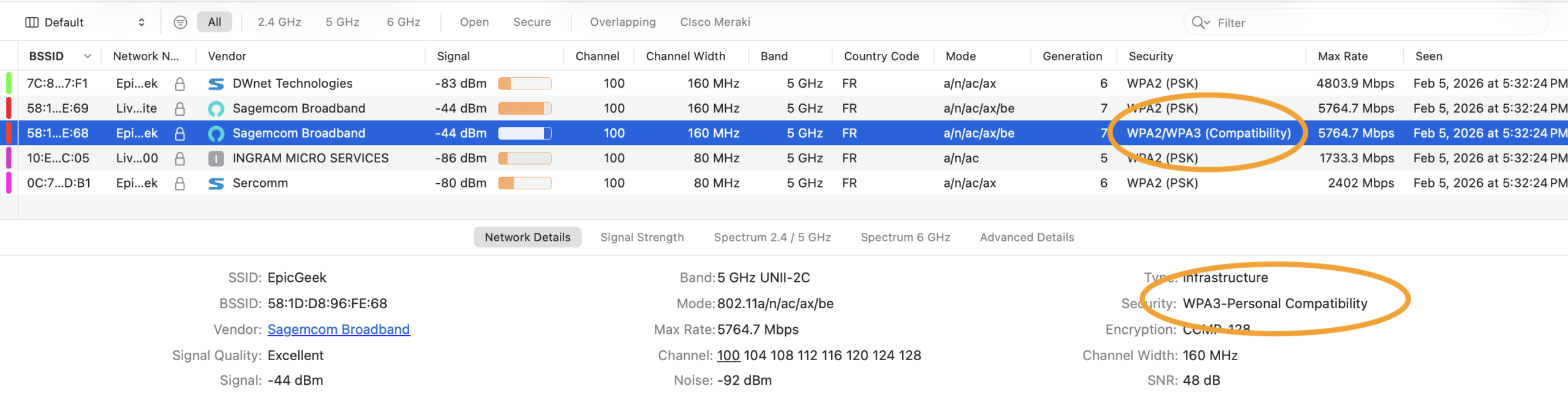
WPA3-Personal Compatibility Mode
This makes it much easier to understand why different clients behave differently on the same network and helps distinguish compatibility mode from transition mode, which can appear similar at first glance but behave very differently in practice.
Final Thoughts
WPA3 adoption continues to be uneven across devices and vendors, and in many environments, the client mix is beyond your control. WPA3-Personal Compatibility Mode allows support for both legacy and newer devices on the same network without requiring multiple SSIDs or introducing obvious compatibility conflicts.
At the same time, the trade-offs are important to understand. While the approach can improve interoperability, it also means that some WPA3-capable clients may still connect using WPA2 if they don’t support RSN Override. In that sense, the effectiveness of the mode depends heavily on client behavior and implementation.
Overall, WPA3-Personal Compatibility Mode reflects an attempt to make WPA3 more deployable in mixed environments by separating compatibility from capability through RSN Override. Whether it delivers the intended benefits in practice will vary depending on the specific client ecosystem.
By clearly exposing this mode, WiFi Explorer helps you understand not just what a network supports, but how it is actually being presented to clients.


Leave A Comment